

- Clear pricing model with four tiers based on your tax filing needs
- Add live advice from a tax pro for $45, a price cut from prior years
- Optional upgrade to Full Service tax prep
- “Free” filers still have to pay to file state returns
- High-end pricing for an experience not much better than some discount options
Among the top leaders in online tax software, TaxAct stands out as a great choice for business owners as the only place you can complete some important tax forms online.
It’s historically our third-place winner for the big tax software programs, thanks to a combination of lower prices and more features than all but TurboTax and H&R Block.
However, with improvements at TaxSlayer and FreeTaxUSA, TaxAct has been slowly losing its competitive edge in some areas. Still, it maintains a target on industry leader TurboTax, as TaxAct continues to offer more features than the discount providers. Keep reading our full TaxAct review below to learn why. You can also see how TaxAct compares in our list of the best tax software.
TaxAct – Is It Really Free?
On the TaxAct homepage, there’s a version that’s “Free,” but only if you meet a limited set of qualifications and live in a state where you don’t have to file a tax return. For most people, the minimum is $39.99 for a state return and no cost for a Federal return if you have simple filing needs.
College Investor FYI: TaxAct is cheaper than TurboTax and more expensive than discount competitors.
As a result, most people using TaxAct will pay between $30 and $70 for federal returns and $39.99 for state returns. That makes it cheaper than the bigger guys, but not by much. And not free.
The only truly free option for TaxAct is through the IRS Free File program, available to a limited number of households earning $65,000 or less per year, or to people with simple taxes who don’t need to file a state return. If you qualify for the free tier and don’t need access to tax help, consider these TaxAct alternatives. Or look to Cash App Taxes and Chime Taxes as completely free options.
What’s New In 2026?
For 2026, TaxAct updated its pricing to simplify the cost for Live Tax Advice and state tax returns. Live Tax Advice is now $45 flat, a 25% decrease from last year, while state returns remain $39.99 each.
This year, TaxAct is launching a mobile app in January 2026 to upload documents with your camera. They’ve also improved the user interface and file upload process.
TaxAct has also been updated to support new tax laws and changes, notably the so-called “One Big Beautiful Bill Act,” which made significant changes to the tax treatment of the standard deduction, state and local taxes (SALT), self-employment, health insurance, and more.
TaxAct has expanded on its live, one-on-one support options. For the 2025 tax season, they’re offering Xpert Assist for $45 or Xpert Full Service starting at $99, including one state.
Good to Know: If you had paid an in-person CPA to do your taxes, the Xpert Full Service option is likely cheaper, and you should get the same final tax return.
Not a change, but it’s good to know that TaxAct is the only online filing software for many small businesses, including S Corps, to file their taxes without downloading a Windows-only application. Filing for a corporation starts at $164.99 plus $69.99 per state.

Does TaxAct Make Tax Filing Easy In 2026?
TaxAct is in the middle of the pack in terms of usability. It includes imports of PDF versions of form W-2 and 1099-B forms, but investors and those with many bank accounts will find the lack of support for importing 1099-INT, 1099-DIV, and 1099-NEC disappointing, particularly as you can now upload 1099 Consolidated PDF files with lower-cost FreeTaxUSA.
The navigation and interface are similar to those of major competitors, such as H&R Block and TurboTax. However, there are still some areas where you won’t find clear explanations of what you need to enter, and you must use the help feature or your favorite search engine to find the answer.
Given the price, it would be good to see expanded help resources, explanations for where to find required tax information, and broader support for importing all 1099 forms. If it could automatically download tax information from banks and investment companies, it could leap ahead of most others.

TaxAct Top Features
TaxAct is a well-known tax software option. For 2026, it has made several improvements to its software, including a streamlined sign-in, filing, and signing process, simplified guidance for key tax forms, and improved data import capabilities. In addition, the following features enhance the filing experience for TaxAct users:
Xpert Assist (Human Tax Support)
A top reason to pick TaxAct is the included access to a human tax expert for your tax questions. While others give you limited technical support for no extra charge, you usually have to pay a hefty added fee for help from a human with questions about your tax filing. Xpert Assist costs $45, and as of the 2026 tax filing season, it’s available to small business owners filing Forms 1065 or 1120-S.
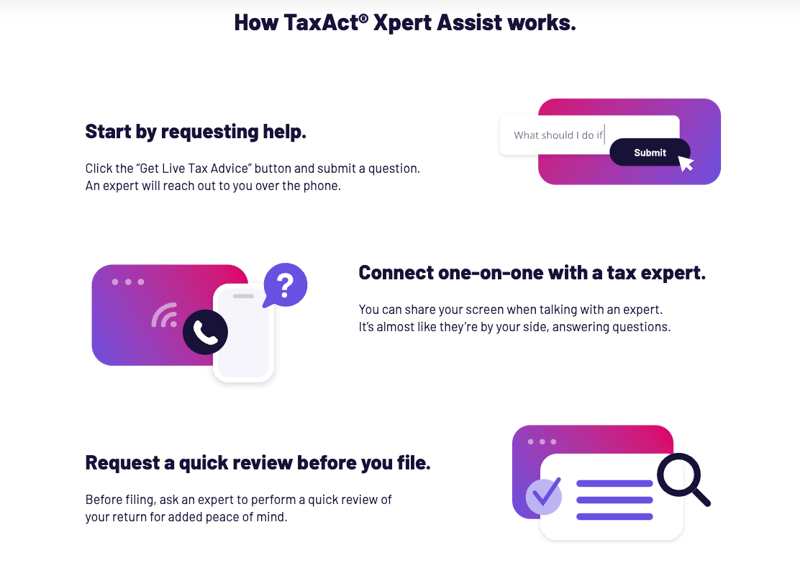
For more help, you can upgrade to full service, which costs $99.95 to $259.95, depending on your tax situation. Business taxes are more expensive. But any of these packages is typically cheaper than paying a traditional in-person tax preparer.
Question And Answer Guidance
TaxAct uses questions and answers to guide users through the software. Filers can skip around in the software, but it guides them back to the questions and answers to ensure everything is completed. If you miss anything, you’re brought back to complete it with a warning message before filing.
Tax Imports
WARNING: Import support for tax documents is limited. You’ll have to enter most fields manually.
TaxAct supports prior-year PDF tax imports, W-2 imports, and 1099-B imports from multiple brokerages. When users upload these documents, TaxAct inputs the information on behalf of the filer. This functionality reduces the chance of errors and the time spent on tax filing.
Note: When we tested TaxAct, we had difficulty uploading our W-2. You can see this in our walkthrough video.
Import CSV Files From Brokerages
In addition to W-2 imports, TaxAct can import 1099-B forms and CSV files from brokers. This functionality could save you significant time on your tax filing if you have stock market investments.
TaxAct is one of the few online tax prep firms that allow you to attach Form 8949 for your crypto transactions. Learn more here.
S-Corp And Trust Taxes Online
Huge feature: Online taxes for any kind of small business
TaxAct is noteworthy as the only major tax software provider that lets you file your taxes for an S Corp or a Trust online. Some others sell downloadable versions for Windows, leaving Mac users stuck. Regardless of your computer, TaxAct allows you to complete Form 1120S and state filings for an S Corp or Trust online. That’s something you can’t find anywhere else.
Honestly, TaxAct is one of the only DIY products that allows this, and during our testing, it was relatively straightforward. You do need an above-average grasp of DIY to do a business return.

TaxAct Drawbacks
TaxAct is a robust software without doesn’t have many missing features. However, the few drawbacks it has could be deal-breakers for some filers.
Errors Only Highlighted At The End
TaxAct has helpful built-in calculators. However, it highlights errors only after a user completes a section. This can be useful for trying to “get into the flow,” but it can also make filing a challenge when you’re unsure how details fit into the big picture and require going back to fix things, making for more back-and-forth.
Extremely Limited Free Filing (State Not Included)
TaxAct limits its free filing to filers with very simple filing situations. Side hustlers, people with HSAs, and those who contribute to retirement accounts will not qualify for the Free tier. And even those who qualify for free federal filing still have to pay for state filing unless they qualify for the IRS’s limited Free File program.
High Cost Given The Functionality
TaxAct is a little less expensive than H&R Block and TurboTax, but it falls behind its larger rivals in terms of user-friendliness. In fact, its experience more closely mirrors several discount tax apps like TaxSlayer and FreeTaxUSA.
TaxAct 2026 Pricing And Plans
TaxAct aligns its pricing with the complexity of a filer’s situation. Filers who don’t think of themselves as “complex” may be surprised to find that they’ll need to use the Deluxe edition.
|
W-2 income, unemployment income, Earned Income Tax Credit (EIC) and child tax credits. |
Itemizers, HSA contributions, People with child care expenses, student loan interest payments. |
Self-employed people (including gig workers) |
||
Note: TaxAct tends to adjust prices throughout the tax season. December and January are the best time to lock in low rates.
How Does TaxAct Compare?
TaxAct positions itself as a premium product, but its performance is comparable to budget tax software. It certainly gets the job done, but the pricing leaves much to be desired. We compared TaxAct, FreeTaxUSA, and TaxSlayer in a head-to-head feature review.
|
Header |
 |
 |
 |
|---|---|---|---|
|
Dependent Care Deductions |
|||
|
Retirement Income (SS, Pension, etc.) |
|||
|
Cell |
Is It Safe And Secure?
TaxAct follows industry-standard security practices and commits to never selling personal information. Despite strong precautions, the company experienced a security breach in 2016. Since then, it has increased its security measures, including stronger encryption. However, the past incident is still a concern.
TaxAct requires multi-factor authentication the first time a user logs in each year and has complex password requirements. With TaxAct and any other financial-related login, following password and online security best practices is critical to keep your information safe.
Contact
TaxAct’s general customer service phone number is (319) 373-3600. Operating hours are Monday – Friday, 8 a.m. to 5 p.m.
Tax filers get access to Xpert Assist for $45 when using TaxAct. Users can receive advice from a tax professional to ensure they’re filing their returns correctly and maximizing deductions and credits without the significantly higher costs of a traditional accountant.
TaxAct also offers TaxAct Xpert Full Service, available during busy tax-filing months. If you pay for this product, a tax pro will complete your entire return for you from start to finish. That costs $99.95 to $259.95, depending on your tax situation.
Why Should You Trust Us?
The College Investor team spent years reviewing the top tax filing options, and we have personal experience with most of the tax software tools. I personally have been the lead tax software reviewer since 2022, and have compared most of the major companies on the marketplace.
Our editor-in-chief, Robert Farrington, has been testing tax software tools since 2011 and has tried almost every tax filing product. Furthermore, our team has created reviews and video walk-throughs of all of the major tax preparation companies, which you can find on our YouTube channel.
We’re tax DIYers and want a good deal, just like you. We work hard to offer informed and honest opinions on every product we test.
How Was This Product Tested?
In our original tests, we used TaxAct to complete a real-life tax return that included W-2 income, self-employment income, rental property income, and investment income. We tried to enter all the data and use every available feature. We then compared the result to all the other products we’ve tested, as well as a tax return prepared by a tax professional.
This year, we went back through and rechecked all the features we initially tested, as well as any new ones. We also validated the pricing options.
Is It Worth It?
Despite performance improvements, TaxAct isn’t competitively priced for what it offers. Charging for state returns on the free tier isn’t consumer-friendly in our opinion. Even for the paid tiers, TaxAct isn’t a great deal in 2026, as others offer better features with a slightly higher cost or similar features at a lower price point.
It’s somewhat less expensive than H&R Block. But H&R Block massively outperforms TaxAct, especially with imports and other convenience features. And tax software options TaxSlayer and TaxHawk offer comparable experiences at a lower price.
It’s also the best (and only) option for S Corp and Trust tax filings online, which is a big draw for many small business owners looking for DIY business tax filing.
Common Questions
Let’s answer a few of the most common questions that filers ask about TaxAct:
Can TaxAct help me file my crypto investments?
TaxAct supports crypto filing and allows users to import .csv files from a brokerage account. Filers who pay for a .csv from CoinLedger or another crypto accounting service can import their files into the software.
Can TaxAct help me with state filing in multiple states?
TaxAct supports multi-state filing. Users must pay the state filing fee for each state they file in.
Do I have to use the self-employed tier for my side hustle?
Yes, side hustlers who earned cash or a 1099-NEC will have to use the Self-Employed tier to file their taxes.
Does TaxAct offer refund advance loans?
No, TaxAct isn’t advertising refund advance loans this year.
Does TaxAct offer any deals on refunds?
No, TaxAct isn’t currently advertising any refund deals.
TaxAct Features By Tier
Here are the features you can expect for each version of TaxAct.
|
W-2 Income: Simple Returns |
||||
|
Earned Income Tax Credits |
||||
|
Deduct Student Loan Interest |
||||
|
Stock And Crypto Investments |
||||
|
Foreign Financial Accounts |
||||
|
Deduct Small Biz Expenses |
||||
|
Small Biz Asset Depreciation |